Why the cash drawer is reconciled every day
A difference is found while it is small. During the day, while everyone still remembers who paid what, the cause of a mismatch comes out easily; a week later the same difference turns into guesswork. That is why the end-of-day count is the last job of the day. It is also a matter of trust: when the doctor, the receptionist and the owner look at the same figure, nobody has to watch anybody with suspicion.
The habit matters even more when more than one person takes money or the clinic has more than one card terminal. This article is about keeping the till in order; for bookkeeping, invoicing and tax, ask your accountant.
What is checked at the end of the day?
Money enters a clinic in three ways: cash, card and bank transfer. Each is verified differently, so the totals are kept apart. The float you leave in the drawer at the start of the day is not a payment; take it off the count, or cash looks higher than it is. The checklist is below.
| Item | How it is verified | Example |
|---|---|---|
| Cash | Count the drawer and take off the float left at the start of the day. | Recorded 1,150, counted 1,150 |
| Card terminals | Read each terminal’s own end-of-day batch total. | Terminal 1: 1,240, terminal 2: 770 |
| Bank transfers | Match the amount and the patient name on the bank statement. | No transfers today, 0 |
| Deposits | Write an appointment deposit on the line of the way it came in. | Credit card, 100 |
| Refunds and cancellations | Write money given back as its own line. | Cash refund, 50 |
| Money taken out | Write an expense paid from the drawer, with its receipt. | Cleaning supplies, 30 |
| Difference | Write the gap between counted and recorded, and its reason. | Drawer 10 over, change error |
How to close the day step by step
The order is the same with a notebook and with software. With software, the difference is that the totals in step five come ready.
- Check that no transaction is missing from the record: every treatment, payment and deposit of the day must be written.
- Count the cash in the drawer and take off the float left at the start of the day.
- Take the end-of-day batch total from each card terminal; write the terminals separately.
- Match bank transfers against the bank statement.
- Work out the cash, card and transfer totals from the record.
- Compare the counted cash and the terminal totals with the recorded totals; write the difference for each item separately.
- If there is a difference, find the cause or note it; do not leave it for the next day.
- Hand over the till: the person who counted signs or saves the report, and the person who checks looks at the totals.
Where to look when there is a difference
A difference is usually not a big mistake but a small slip in recording. Read a one-off small difference and a repeating one differently: for the repeating one, note which item, what time of day and whose shift. Look at these first:
- The payment method may be wrong: cash was taken, card was recorded.
- A split payment may have been written under one method: half cash, half card.
- A payment that went through one terminal may have been recorded against another.
- Change was given but the record was entered with the full amount.
- A deposit or a refund was not written as its own line.
- A transaction was deleted or corrected during the day.
What changes with several terminals, doctors and people?
The till stays one; the ways money comes in multiply. Name each card terminal, for example after its bank, and compare batch totals per terminal; a difference stays with the terminal it came from. The number of rooms or chairs does not change the till; money is totalled by how it was paid, not where it was earned. If you also want turnover per doctor, write the responsible doctor on every transaction.
In a small practice one person counts and records; that is not a problem. With more than one person, separate counting from checking: the receptionist counts and records, the owner looks at the totals. With a notebook, step five is the longest step; patient tracking software that keeps appointments, payments and balances in one place works that total out from the records.
The part the patient has not paid does not enter the till; it is tracked separately as an open balance. For that, see the patient balances and installments guide. Money for a package enters the till on the day it is taken, while the sessions are given later; to track the remaining sessions see the session package guide.
How the end of day looks in Clinigim, and what it does not do
In Clinigim every transaction is recorded with its amount and its payment method, that is cash, credit card or bank transfer; a split payment is entered on one transaction with more than one method. The totals come from these records; you do not add them up by hand. The payment and cash features work like this in the app today:
- The Cash Status card on the dashboard shows today’s collections as cash, credit card and bank transfer separately, each with its share and the total.
- On the Transactions screen you choose Today, Yesterday, This Week, This Month or a custom range; the Total Collection, Cash, Credit card, Bank transfer, Total Remaining and Transaction Count cards show that range. You can filter by doctor, payment method, status and POS terminal.
- If you pick the POS terminal on a card payment, the POS Report shows each terminal’s total and transaction count separately.
- The clinic owner picks a date in the End of Day Report and downloads that day’s report as an Excel file.
- A deposit marked Deposit Received on the appointment is recorded as a payment; it is also listed under the Deposit Collections tab in Reports and is not counted twice in the total.
- A wrong payment is reversed with Undo; the record stays in the audit log.
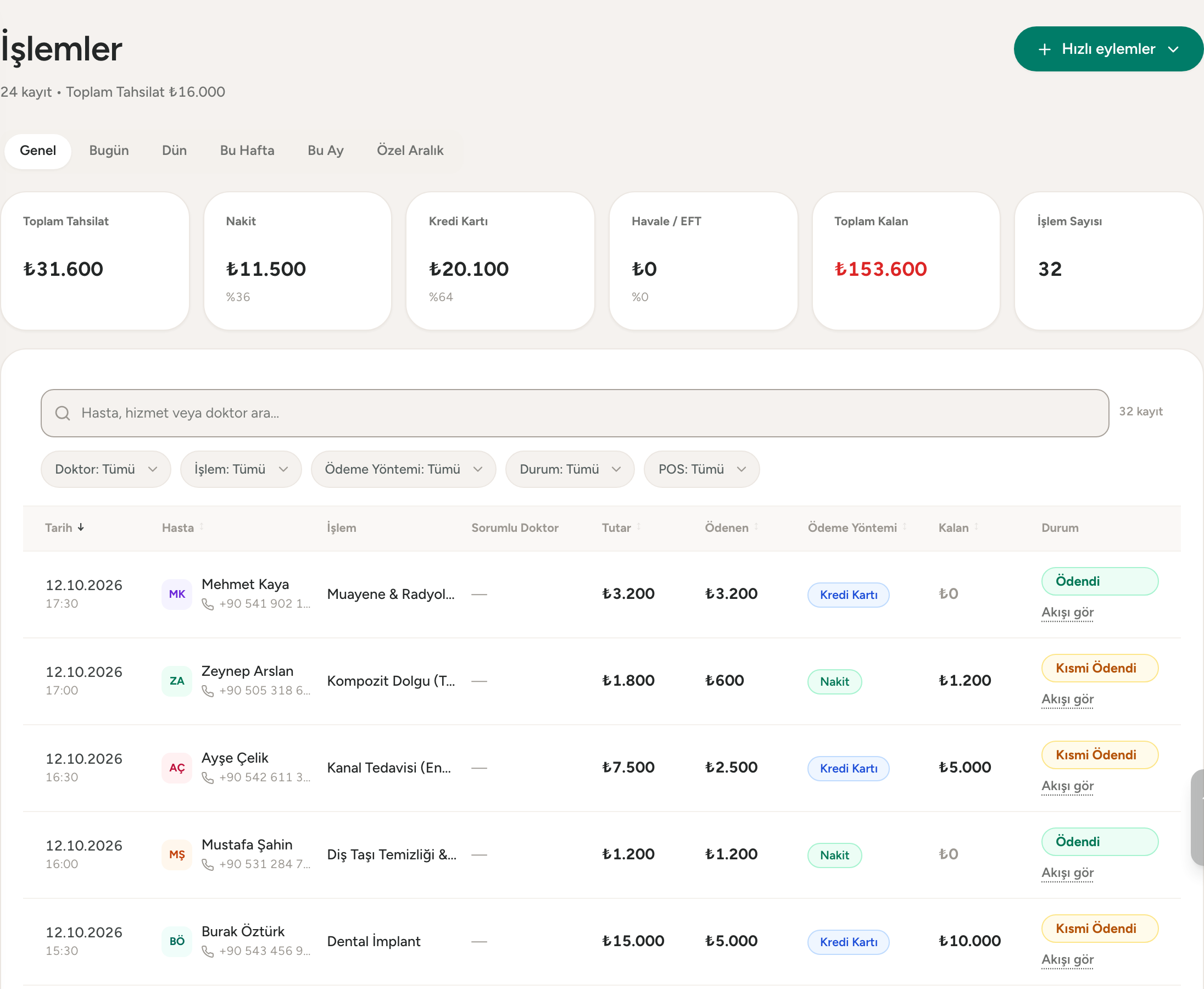
Clinigim has no closing screen where you enter the counted cash or the difference, and it does not lock the till: you count the cash and the terminal batch yourself and compare them with the total the program shows. Who sees amounts on the dashboard is set by permissions. Clinigim does not issue tax invoices and does not replace a certified cash register; for official documents ask your accountant.
Frequently asked questions
- Does the cash drawer have to be reconciled every day?
- Whether there is a bookkeeping or tax obligation is a question for your accountant. For keeping the till in order, doing it every day keeps a difference small and its cause easy to remember. If a check is done once a week and a difference turns up, finding which day and which payment it belongs to is much harder.
- What do I do when there is a cash difference?
- Look at the payment method first: cash recorded as card, and the other way round, is the first place to check. Then check split payments, the separate totals of each card terminal, change given and deleted transactions. If you cannot find the cause, note the amount, the date and the person who counted; a repeating difference points to a problem in the routine.
- Are cash and card kept as separate tills?
- Yes. Cash is counted; card payments are verified against the terminal’s batch total. The two are checked in different ways, and if they are mixed the cause of a difference cannot be found. Bank transfers are matched separately against the bank statement. In Clinigim every transaction is recorded as cash, credit card or bank transfer, and the Cash Status card on the dashboard shows the three separately.
- Can I keep the end-of-day count in Excel?
- Yes. Columns for date, patient, amount and payment method are enough; at the end of the day you total by method. The difficulty starts when several people write in the same file and corrections leave no trace. In Clinigim the records are already split by payment method, and the end-of-day report exports to Excel.
- Who can take the end-of-day report in Clinigim?
- The End of Day Report button is on the clinic owner’s screen; the owner picks a date and downloads the report as Excel. Whether staff see amounts on the dashboard is set by permissions; staff without the permission are not shown amounts. There is no closing screen where you enter the counted cash; you do the count yourself and compare it with the program’s total.
Related pages
Try Clinigim free for 14 days
No card needed · Set up in 2 minutes